
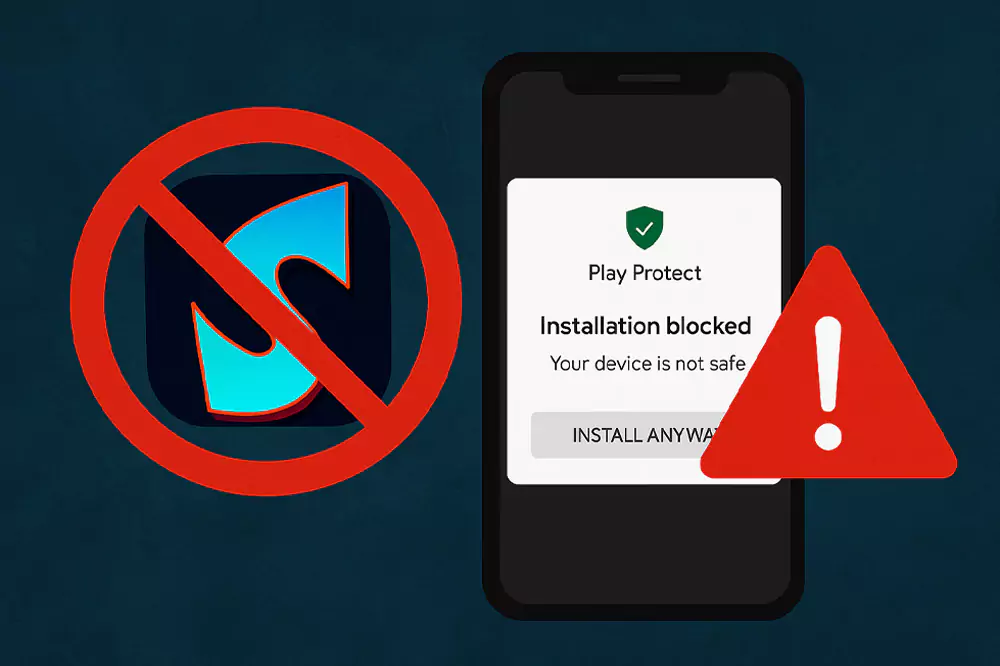
Many users face a common issue when installing Sportzfy TV APK: the Play Protect blocked this app or Installation warning message. This can be worrying, especially if you’re new to APKs. The good news is that Sportzfy itself is safe — these warnings appear because the app is not listed on the Google Play Store, not because it’s harmful.
If you’ve already used Sportzfy before, you know how useful it is for streaming cricket, football, UFC, and other sports. But for new users, installation warnings can cause confusion. That’s why we’ve put together this simple guide to help you install the app without issues.
And remember, to stay safe always download the latest version directly from SportzfyTVAPK.net. If you’re still unsure about safety, we’ve explained everything in our Is Sportzfy TV App Safe article.
Note: Play Protect warnings appear for all apps outside the Google Play Store. This doesn’t mean Sportzfy is unsafe.
Quick Fix – How to Solve Play Protect Error
If Play Protect is blocking your Sportzfy APK installation, don’t worry — this is a common Android warning for all third-party apps, not just Sportzfy. Here’s how you can fix it in a few easy steps:
Tip: If you don’t see the Install anyway option, disable Play Protect temporarily, complete the installation, and then switch it back on.
1. Download from a trusted source: Always get the latest version from SportzfyTVAPK.net. Fake APKs from random sites are the main cause of problems.
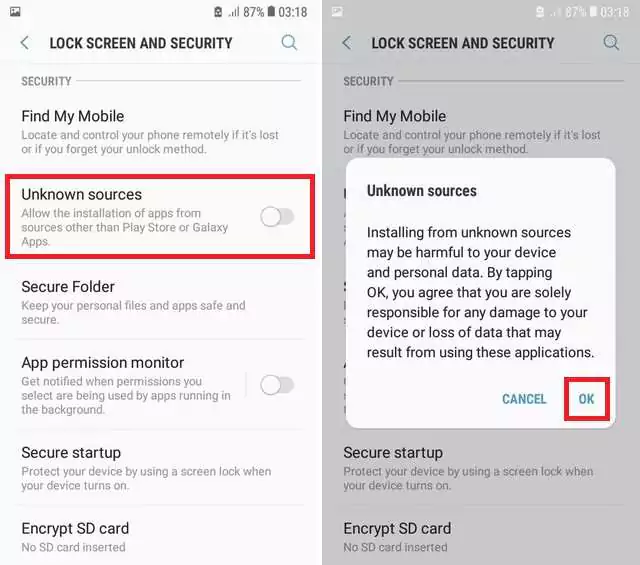
2. Allow unknown apps: On your Android phone, go to Settings → Security → Install unknown apps. Select your browser or file manager and turn on Allow from this source.
3. Bypass Play Protect warning: If Play Protect blocks the APK, tap More details and then choose Install anyway. This skips the generic warning.
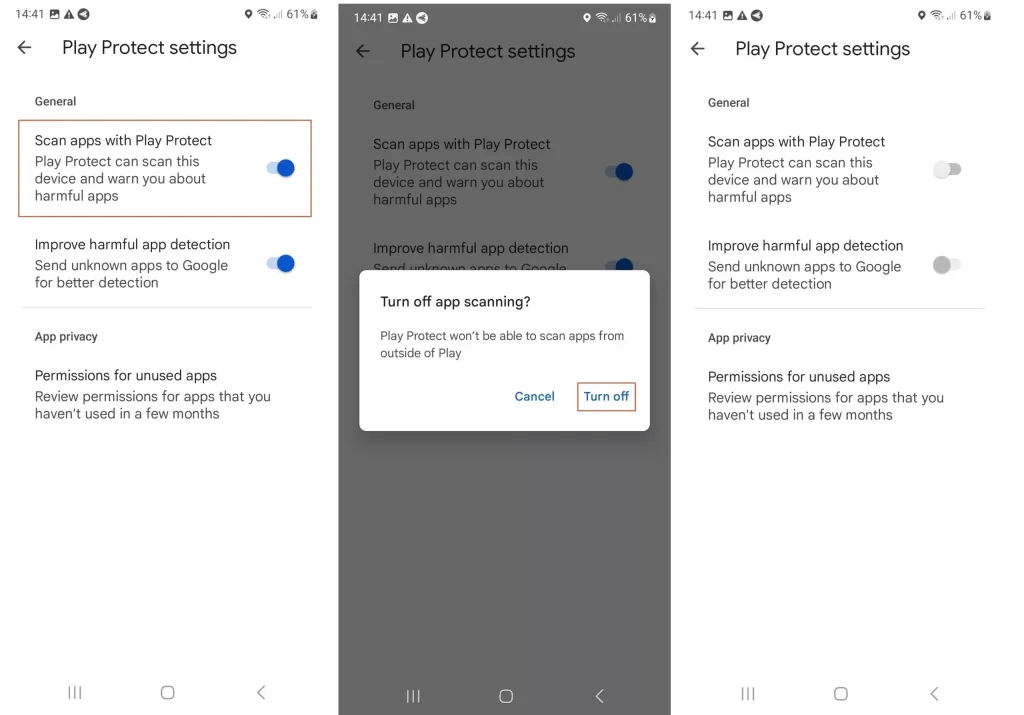
4: Temporarily disable Play Protect (optional): Open the Google Play Store → Profile icon → Play Protect → Settings. Turn off Scan apps with Play Protect, install Sportzfy, then turn it back on.
5: Clear cache if installation fails: If the app still won’t install, clear the cache of your package installer (Settings → Apps → Package Installer → Storage → Clear Cache) and try again.
Once you follow these steps, the warning disappears and Sportzfy installs normally.
Why Does Play Protect Show This Warning?
Seeing a Play Protect warning when installing Sportzfy TV APK can look scary, but it’s actually a generic security alert. Here’s why it happens:
Reminder: Sportzfy is safe if downloaded from the official APK source. Most problems come from fake or outdated versions.
- Not on Google Play Store: Sportzfy is shared as an APK file because it doesn’t meet Google’s Play Store policies for live streaming apps. Play Protect automatically flags all apps that aren’t downloaded from the Play Store, even if they are safe.
- Third-party installation: Android treats any third-party APK as “unknown” by default. That’s why you’re asked to enable install from unknown sources.
- Generic protection system: The warning doesn’t mean the app is harmful. It simply reminds you to be careful with downloads. If you’ve installed the file from SportzfyTVAPK.net, you don’t need to worry.
- Lookalike APKs: The real issue comes when users download fake versions from unverified sites. These can contain unnecessary ads or even harmful code, which is why Play Protect tells you to double-check.
In short, the warning is more about where the APK comes from, not the app itself.
Is Sportzfy Safe Despite the Warning?
Yes — Sportzfy TV is safe to install and use if you download it from a trusted source. The app itself does not contain viruses, spyware, or harmful code. Millions of people already use it daily to stream cricket, football, UFC, and other sports without facing security problems.
Highlight: Millions of users stream sports daily on Sportzfy without facing security issues.
The Play Protect message appears only because Sportzfy isn’t available on the Google Play Store. It’s the same with many other streaming apps. If you want a deeper breakdown of safety concerns, you can check our full guide on Is Sportzfy TV App Safe?.
For users who like to keep backups in case of issues, we’ve also shared a list of Sportzfy Alternatives, covering apps like Cricfy, SportzX, and Tamasha.
So while the warning may look alarming, there’s nothing to worry about when you’re using the official APK.
Extra Tips for Smooth Installation
Most users can install Sportzfy after bypassing the Play Protect warning, but if you still face problems, these quick tips can help:
Warning: Avoid “Pro” or “Mod” versions of Sportzfy. These modified APKs are often unstable and risky.
- Clear cache before retrying – Go to your phone’s package installer app and clear the cache. This fixes many failed installation attempts.
- Use the latest version – Outdated APKs may not install correctly. Always check you’re using the current release.
- Avoid “mod” or “pro” versions – These modified files often cause installation errors and may contain unwanted code.
- Try a VPN if needed – In some regions, APK downloads can be restricted. A VPN helps ensure smooth access.
- Keep an alternative ready – If installation still fails, apps like Cricfy or SportzX work well as backups. We’ve compared them directly in our guides like Sportzfy vs Cricfy and Sportzfy vs PikaShow.
These small steps usually solve any remaining issues so you can enjoy Sportzfy without interruptions.
Alternatives If Installation Still Fails
If the installation problem doesn’t go away even after trying all the fixes, you can use backup apps and websites to keep watching your favorite matches:
- Cricfy TV – Best for cricket-only coverage (IPL, PSL, World Cup).
- SportzX TV – A multi-sport app that feels closest to Sportzfy.
- Tamasha App & Website – Sports plus entertainment, available on Android and browsers.
- CricFree / FreeStreamsLive – Browser-based sites that work well on iOS and PC.
For a complete list with details, check our guide on the Best Sportzfy Alternatives in 2026.
FAQs
Conclusion
The Play Protect warning during Sportzfy installation may look alarming, but it’s just a standard Android alert for apps outside the Play Store. Once you allow installation from unknown sources and follow the quick fix steps, Sportzfy installs and runs without any issues.
As long as you download the APK from a trusted source, you can enjoy cricket, football, UFC, and more without worrying about safety.